|
|
Hi Mr.Yoon, Please check the OTA flow. |
|
|
Hi Wooshin Kang, Could you check it ? |
|
|
Hi Wooshin, May I have your comments after your review on OTA flow? As you know, we have to implement OTA app at VS-550 side so these information shall be ready and clarfied before we implement it. |
|
|
Hi Mr.Yoon and Mr. Kang, According to the meeting today, please provide APIs and Features below by 4/12. When the APIs and Features are ready, we still need 3 weeks to develop OTA App. A. OTA Server 1. API to get the FW information from OTA server. The information includes FW version, URL, size, checksum, and update mode. Update mode could be configured by server to choose a better timing to update. 2. The IP address or domain name of the server should be fixed. (Will be hard coded in the Android App.) 3. SSL certification (HTTPS) B. APIs shall be provided by AMP Board 1. Get current FW version 3. Get the progress/status of OTA 2. Start OTA 4. Get the state of A113X C. Features have to be implemented at AMP Board side 1. Setup eMMC storage in AMP board(or one partition of eMMC) as USB storage of VS-550 Board 2. Provide error handling while OTA failed (Maybe A/B System update) |
|
|
Hi Mr.Yoon and Mr. Kang, About B. APIs shall be provided by AMP : It is recommended to use a file-based API. 1. Get current FW version => App reads FW version from file current_version. 2. Start OTA => a. App will write 1 to file start_ota. b. While A113X side checks 1 from start_ota, it will re-write 0 or empty string to start_ota and start the OTA procedure of A113X side. 3. Get the progress/status of OTA => 1. App reads update status from file update_status. It may include idle/updating/completed. 2. In updating state, App reads updating progress from file update_progress. 4. Get the state of A113X => App reads A113X state from file amp_state. It may include off/running/updating/... ps. The API implementation details could be discussed. Please let me know if you have any questions. |
|
|
Hi Mr.Yoon and Mr.Kang, Is there any update about OTA server and APIs? |
|
|
Hi Becan, We are finding best solution for this one and we need more time. Please wait. Thanks. |
|
|
Hi Mr.Jung, Could you update the schedule of OTA server and APIs ? |
|
|
Hi Mr.Jung, When could you provide OTA server and APIs ? Is there any update? |
|
|
Hi Mr.Jung, Do you have any update? |
|
|
Copy from Mantis 1184 ------------------------------------------------------------------------------- From Wooshin: Hi all, It is about s/w upgrade method. We are successful to transfer s/w image from SWAN to A113X using usb ADB. A113x side adb is included in SDK of Amlogic and adb server of SWAN should be cross complied. Following are expected OTA sequence. 1. A113X upgrade image is included in SWAN upgrade image. 2. SWAN send image to specific folder of A113. ( by adb ) 3. SWAN send adb reboot command to A113 for upgrade. 4. A113 enter recovery mode and start upgrading. # We will supply adb server binary for SWAN. Thanks. |
|
|
Hi Wooshin, Here are some questions about your OTA flow. a. What size is the A113X ota file? We need to evaluate the partition size arrangement for future updating. b. SWAN is host mode and A113X is device mode. Is it correct? c. Is the OS of A113X something like Android OS? Why could you update A113X with adb reboot command? d. Does A113X provide A/B system update function? e. Could you provide image and binary for us to test? |
|
|
Hi Bcan, Hi Wooshin, Here are some questions about your OTA flow. a. What size is the A113X ota file? -> I don't know exact size yet, you will try to make more smaller. Anyway now is about 87M. b. SWAN is host mode and A113X is device mode. Is it correct? -> Yes, As I explain already, I will supply binary file for sending image to you. c. Is the OS of A113X something like Android OS? OS is linux and adb is ported. -> Why could you update A113X with adb reboot command? You can use adb command in SWAN like PC. d. Does A113X provide A/B system update function? -> Not supported e. Could you provide image and binary for us to test -> I will. |
|
|
Hi Bcan AudioDSP FW Update Method at VS550 is as follows.. Related files are here. http://altserver01.iptime.org/A113_images/0421_OTA_Test/ 1) Please burn the file below to AudioDSP by using Amlogic Burning Tools. - aml_upgrade_package.img 2) push adbsub command to VS550. @@ temporarily @@ put the attached "adbusb.tar.gz" in VS550. I will temporarily use /data/adbsub on VS550. *PC tar zxvf adbusb.tar.gz adb connect [IP of VS550]:8554 at PC adb push adbsub /data/ 2) Add the AudioDSP update file(software.swu) to VS550 *PC adb push software.swu /data/adbsub/software.swu 3) connect VS550 and AudioDSP *PC adb shell *VS550 cd /data/adbsub/ export TMPDIR=/data/adbsub/ export HOME=/data/adbsub/ ./adbsub devices ==> Here, if the AudioDSP board is connected normally, the device number is displayed. 4) Update file is transferred to AudioDSP at VS550 *VS550 ./adbsub push software.swu /data/software.swu 5) update start at VS550 *VS550 ./adbsub shell urlmisc write /data/ ./adbsub shell reboot The audioDSP will update at revocery. if you have any question , please contact me . Thanks you YK.Jung |
|
|
Hi Mr.Jung, There is no aml_upgrade_package.img under your download link 0421_OTA_Test. Do you miss that file? |
|
|
Hi Wooshin, 1. After doing integration with adbsub and Android App. There are some sepolicy issues of using adbsub in Android App. Because using adbsub in shell is so different with using adbsub in Android App, there will be sepolicy issues and some of them are neverallow in ATV. More time is needed to overcome these sepolicy issues. Modifying adbsub is also needed. We will list our requests about adbsub and provide test App for you. This may take extra 1~2 weeks. 2. There are several features we need. a. Get current FW version b. Get the progress/status of OTA c. Get the state of A113X d. If the ota file is incorrect, A113X will stay in an error state. It might be recovery mode and can be recovered by power cycling. How to detect this kind of error? |
|
|
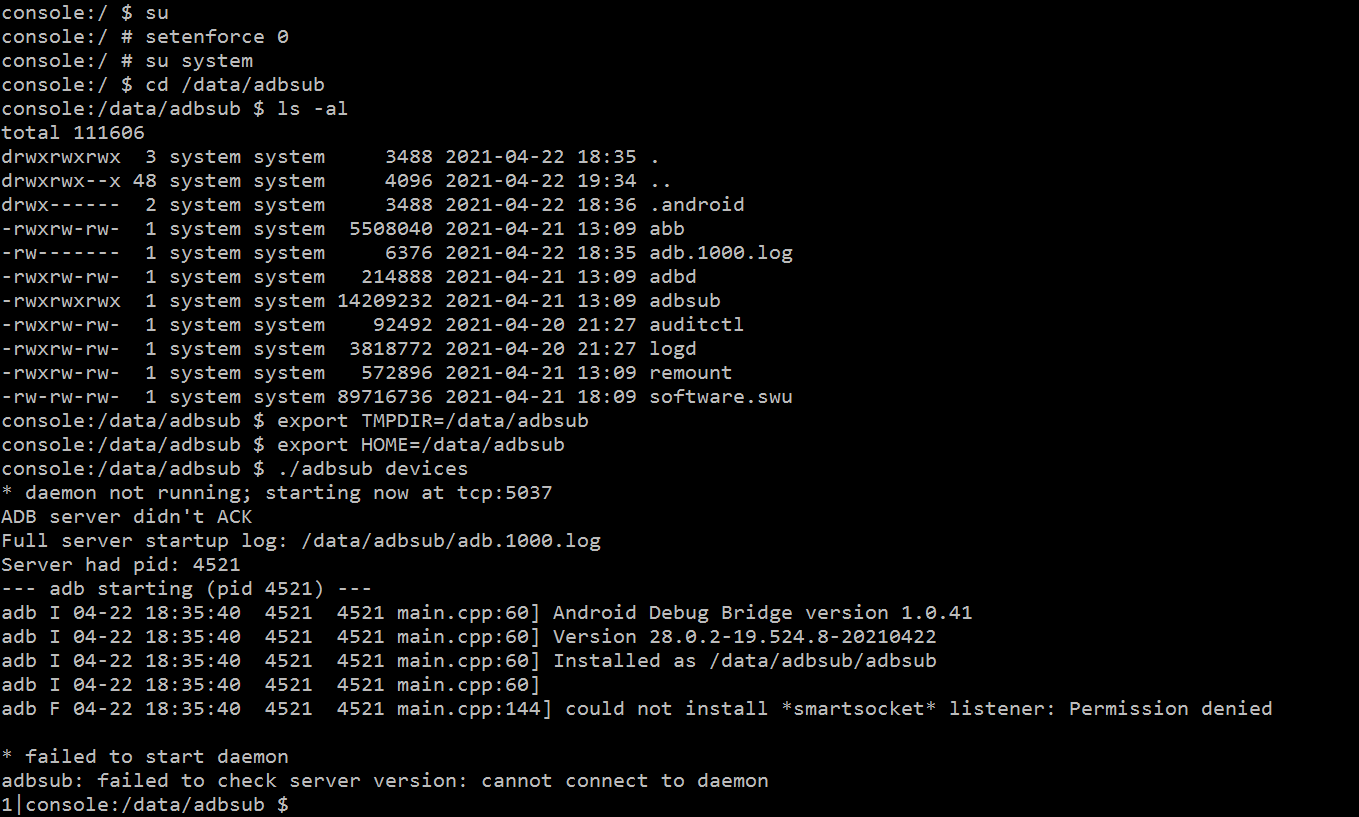
Hi Wooshin, Here is the link of test App: AmpOtaClient. https://drive.google.com/file/d/1ciuoRa4zcHeqaTNQWNGI4qZRck4UorUs/view?usp=sharing The first problem we encountered is that [adbsub devices] doesn't work well. In command shell with root, [adbsub devices] works well and it shows [0123456789ABCDEF device] for A113X. In the App with system privilege, [adbsub devices] will not show [0123456789ABCDEF device]. It's not a sepolicy issue because I type "setenforce 0" before testing. Please check adbsub for this problem. Steps: 1. connect to VS550 shell 2. adb install -r AmpOtaClient.apk 3. su 4. setenforce 0 5. am start com.vasott.ampotaclient/com.vasott.ampotaclient.MainActivity 6. Press button "LIST DEVICES" 7. Wait about 10s (the first time) 8. While this line "List of devices attached" is showing, this command is finished. And we can't see [0123456789ABCDEF device]. |
|
|
Hi Bcan, Please try after changing like below. 1. chown system:system -R /data/adbsub 2. Is AmpOtaClient system app ? if not, Please give system permission to AmpOtaClient. Thanks. 스크린샷 2021-04-27 오전 10.32.53.png (119,973 bytes) |
|
|
Hi Wooshin, 1. AmpOtaClient is a system app already. 2. It still can't show [0123456789ABCDEF device] after chown command. SystemApp.png (20,584 bytes) |
|
|
Hi Wooshin, Update the results by shell command as system. console1.png (63,184 bytes) |
|
|
Hi Bcan, We are checking now. |
|
|
Hi Wooshin, Is there any update? |
|
|
Let's follow up on below ticket. https://mantis.cnsbg.foxconn.com/vaas/view.php?id=1209 |
|
|
Update OTA flow based on 0504 image. |
|
|
Hi Wooshin, Please help to check and review updated OTA flow provided by Bcan based on image released on 5/4 |
|
|
Hi Bcan and Jacky, I will check document and back. SKB wants all processing for OTA will be done in background. So we don't need to draw UI. |
|
|
Hi Wooshin, Because there is no audio output during Amp OTA, showing UI will let users know what happened now. Not showing UI during Amp OTA may make user confused and cause many VOC cases. Please confirm this. |
|
|
Hi Bcan, I will suggest two options to SKB like below and if i would get response from them, i will share. 1. UI is showing during upgrading. 2. Upgrading will started at time that user doesn't watch the tv. For example, AM 02:00 or 03:00. Thanks. |
|
|
Hi Bcan, SKB did select option 2. Upgrading should be started in standby mode at AM 03:00. If it is not standby mode at 03:00, upgrading will be started next day. Thanks. |
|
|
Hi Wooshin, 1. There are 2 cases those you have to confirm. a. Some users power off their device every night. Amp board will not update according to the rule. b. What if a user turning on TV at 03:00:15 (Amp board is during OTA) ? The user will encounter no audio problem. Please confirm these. 2. OTA App use StorageManager to get usb storage path of A113x and the only way to distinguish them is invoking getDescription(). - Kinston, Description=Kinston - Transcend, Description=Transcend - SanDisk, Description=USB drive - A113X, Description=Linux USB drive It will be better if the description of A113X storage could be more specific. Maybe using "A113X USB drive". Could you help to modify the description? |
|
|
Hi Bcan, 1. We know about them. 2. Please give us OTA APP for test. |
|
|
Hi Wooshin, 1. OK, thanks for your confirmation. 2. AmpOtaClient, https://drive.google.com/file/d/1H6fBXnFEy0yRWexzFfA30A4A_qVTNMfg/view?usp=sharing a. adb install -r AmpOtaClient.apk b. Press [ENABLE A113X USB] c. Press [LIST USB STORAGE DEVICES] |
|
|
Hi Bcan, I am sorry but I can't find where would be changed for "A113X USB drive". Can you use "Linux USB drive" without change..? or Please inform me about point where is would be changed if you know. Thanks. |
|
|
Hi Wooshin, I don't know how to change the description either. As a workaround, maybe you can place an empty file "A113X_USB_Drive" in the A113X usb storage. When we get the path '/storage/sdcard1', we will check the existence of '/storage/sdcard1/A113X_USB_Drive'. |
|
|
Hi Bcan, I will and release new image. Thanks. |
|
|
Hi Bcan, check below image. http://altserver01.iptime.org/A113_images/0511/ |
|
|
Hi Wooshin, The 0511 image has some problems: 1. State transition is not correct. a. Update successfully 0x00 -> 0x01 -> 0x02 -> 0x04 -> 0x01 -> 0x03 b. Use an incorrect ota file and update fails 0x00 -> 0x01 -> 0x02 -> 0x01 -> 0x02 -> 0x05 c. No ota file and update fails 0x00 -> 0x01 -> 0x03 2. There is no "A113X_USB_Drive" file found in A113X storage. Please correct them and provide new image. |
|
|
Hi Bcan, I did test 3 times, all time was OK. Please check below. http://altserver01.iptime.org/A113_images/0513/ |
|
|
Hi Wooshin, 1. 0513 image is OK. 2. Amp OTA feature is committed. commit b9862a9be1485167ff1a35f014fe5f815da4625b Author: Bcan <bcan.cc.yeh@fii-foxconn.com> Date: Fri May 14 13:52:33 2021 +0800 Add Amp OTA feature. 3. The Amp OTA file included in the SWAN FW now is version 0x0B. You can test it by a. using Amp board with version 0x0A. b. using date command to accelerate the test = remember to remove ethernet cable first = date "2021-05-16 02:59:50" c. using logcat to check OTA procedure. = logcat -s ampclient AmpService commFunc UpdateTransition AmpReceiver |
|
|
Hi River, I will check and be back. |
|
|
Update OTA flow |
|
|
Hi Wooshin, According to the information from Wellang, we need to mute Amp before A113X OTA and unmute Amp after A113X OTA. This feature is implemented and AmpOtaClient.apk is also released. ------------------------------------------------------------------------------------------------------ commit 972739167c7455a2e369ba49e7521fbb516773a4 Author: Bcan <bcan.cc.yeh@fii-foxconn.com> Date: Fri May 21 15:40:22 2021 +0800 Update AmpOtaClient ------------------------------------------------------------------------------------------------------ Please check it. |
|
|
Dear Bcan, Amp is controlled by SWAN ( VS550 ), Please discuss with River. @River, Please support Bcan. Thanks. |
|
|
HI Wooshin, I had already discussed this with River and this feature was implemented. Please verify it. Thank you. |
- yk.jung ( (ALTech) Younkwang Jung ) developer